ClinicalFlow listens to your patient encounters and generates
structured clinical notes in real time — with 22 specialty templates, interactive dental charting,
and automatic medical coding. Works online or completely offline in 37 languages.
Start your 14-day free trial.
Clinical documentation consumes hours every day — time that should be spent with patients.
The result is burnout, reduced care quality, and notes finished long after the encounter ends.
1.84 hrs
Per day spent on EHR documentation outside of work hours alone, per a study of 301,603 U.S. physicians (JAMA Internal Medicine, 2022)
From encounter to signed note in minutes, not hours.
1
Record
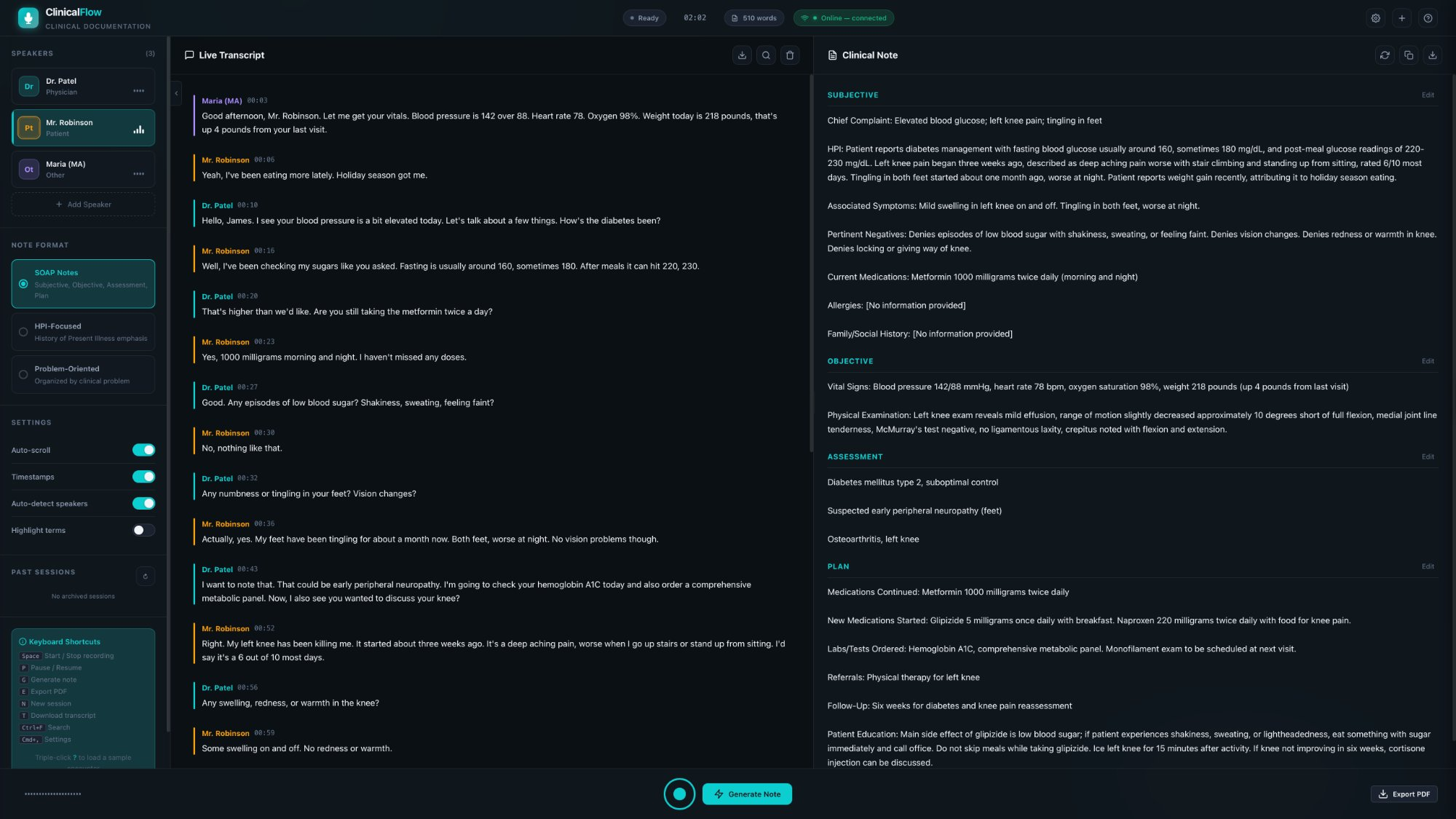
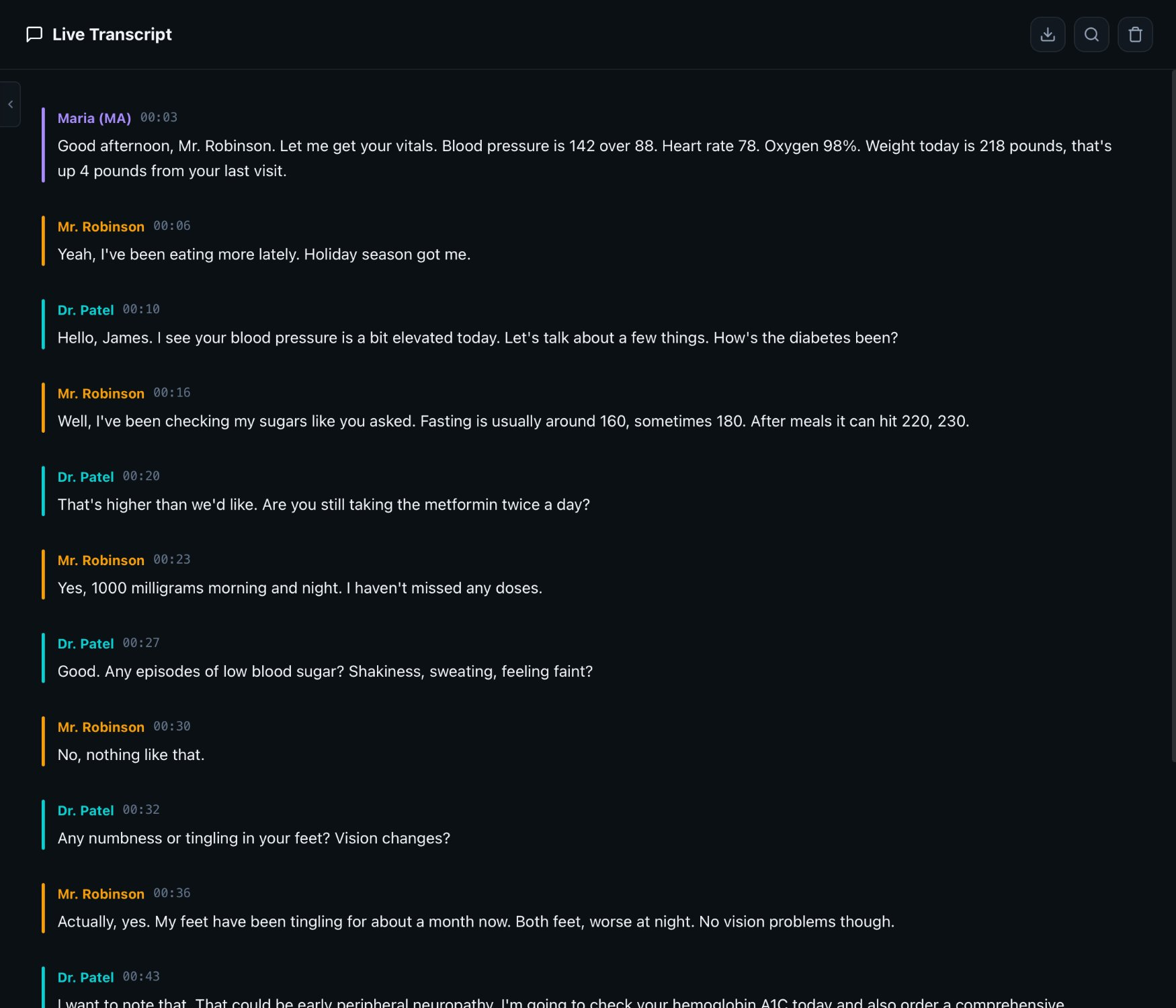
Start recording your patient encounter. ClinicalFlow captures audio and transcribes speech in real time with automatic speaker identification — distinguishing physician from patient in 37 languages.
2
Generate
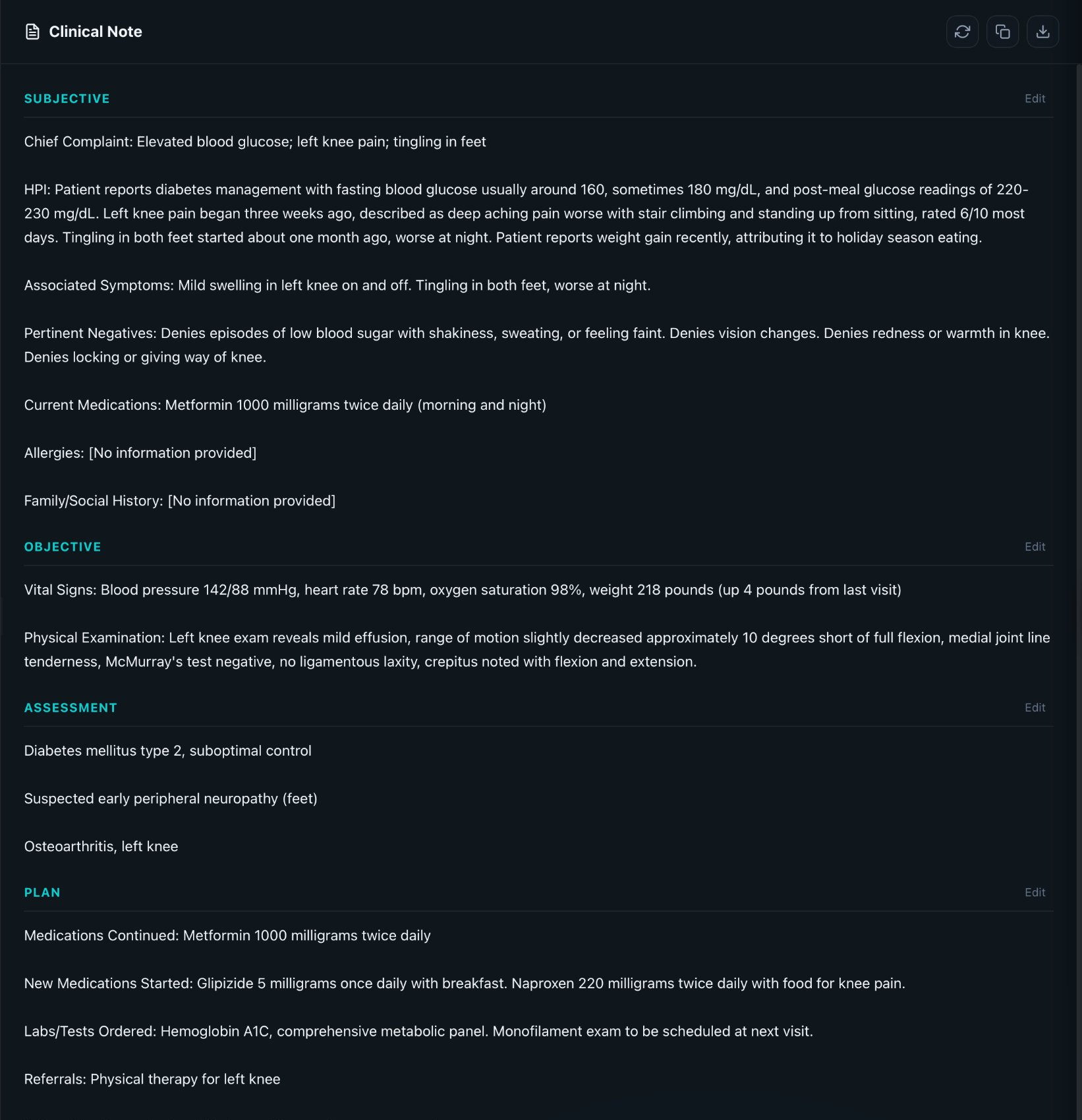
With one click, AI analyzes the full transcript and produces a structured clinical note in your preferred template — from SOAP to cardiology to dental exams. A verification pass catches errors, contradictions, and omissions.
3
Review & Export
Edit any section directly in the app. Billing codes are generated automatically. When you’re satisfied, export as PDF, copy to clipboard for your EHR, or save as a text file. The note is ready in minutes.
Want to try it without a patient? ClinicalFlow includes 4 built-in demo scenarios — general medicine, dental, radiology, and behavioral health — so you can explore every feature before your first real encounter.
Features
Everything you need. Nothing you don’t.
Built for real clinical workflows by people who understand medicine.
Real-Time Transcription
ClinicalFlow transcribes speech as it happens. Words appear on screen within milliseconds, letting you monitor the encounter in real time. No waiting, no post-visit processing.
Medical-grade accuracy with Deepgram Nova-3 Medical (online) or Whisper Small (offline) — with medical vocabulary conditioning for 55+ drug names, anatomy, and vitals
Automatic speaker diarization — physician, patient, and other speakers identified and color-coded separately
325+ post-processing correction patterns across 6 languages — automatically fixing drug names, conditions, and vital sign formats
37 languages supported — including English, Spanish, French, German, Portuguese, Chinese, Japanese, Korean, Hindi, Arabic, and 27 more
Hallucination filtering automatically detects and removes Whisper false positives — silence artifacts, background sounds, and phantom text
AI-Powered Note Generation
One click transforms your transcript into a complete, structured clinical note. ClinicalFlow uses a sophisticated prompt system with strict evidence-extraction rules — every line in the note traces back to something explicitly said in the encounter.
Three AI engines: Claude Haiku 4.5 (cloud, best quality), Ollama (local, free), or rule-based (deterministic fallback, no AI required)
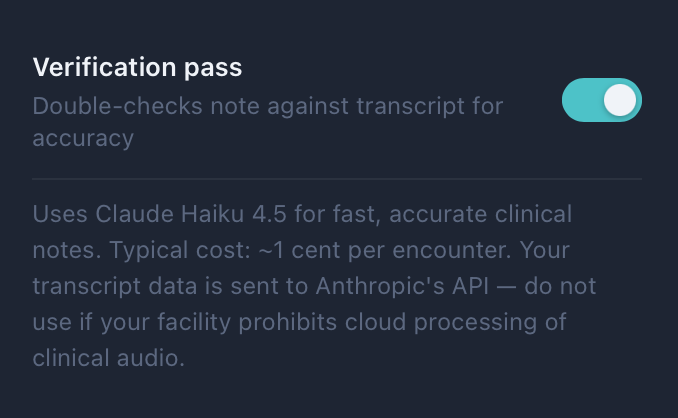
Two-pass verification system: generates the note, then audits it against the transcript for hallucinations, contradictions, and omissions
Safety rules prevent fabrication — never invents findings, diagnoses, or exam results not in the transcript
Multilingual note generation — clinical content written in the encounter language while section headers stay in English for EHR compatibility
Multi-Speaker Management
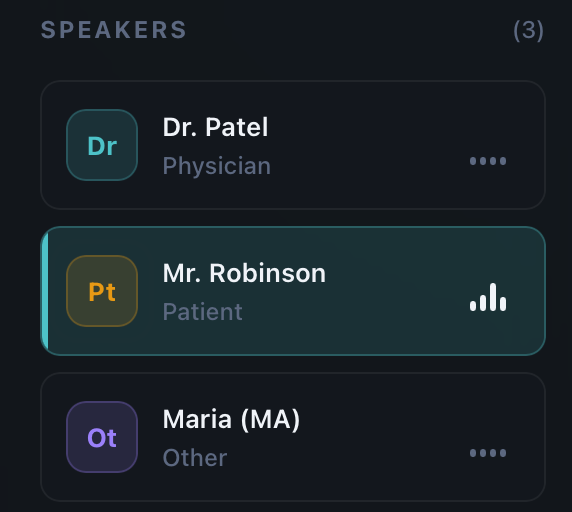
Add and manage speakers with assigned roles. Each speaker gets a unique color in the transcript, making it easy to scan who said what. ClinicalFlow uses speaker identity to correctly route information — patient-reported symptoms go to Subjective, physician observations go to Objective.
Three speaker roles: Physician, Patient, and Other — each with a distinct color and abbreviation (Dr, Pt, Ot)
Color-coded transcript entries for instant visual identification
Auto-detect speaker changes based on 1.5-second silence detection and Deepgram diarization data (online mode)
Edit, Export, Done
Every section of the generated note is directly editable. Click on any text to modify it. Your edits are preserved through exports — what you see is what you get.
PDF export with header, disclaimer, section formatting, and timestamp footer — including dental chart SVG if applicable
One-click copy to clipboard — paste directly into Epic, Cerner, Athena, or any EHR
Session archiving — save completed encounters with full transcript, note, and audio recording (WebM/Opus or MP4)
Archive browser — browse, load, and delete past sessions sorted newest-first with size and audio indicators
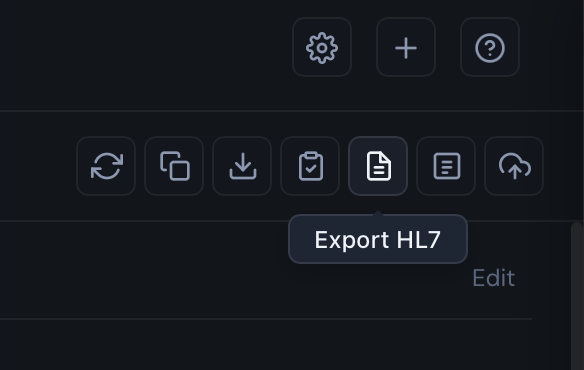
Configurable export actions — enable or disable Copy for EHR, Export HL7, Insurance Narrative, and Sync to PMS buttons from Settings
Templates
22 specialty templates. Your workflow, your format.
Choose the note structure that matches how you practice. Switch anytime, or create your own custom templates.
General
Core Clinical Formats
The most widely used formats in outpatient medicine. Four clean sections that separate patient-reported information from clinical findings, assessment, and treatment plan.
SOAPHPI-FocusedProblem-Oriented
Behavioral Health
Psychiatry & Behavioral Medicine
Structured formats designed for mental health encounters. DAP for psychiatry sessions and BIRP for behavioral health documentation.
DAPBIRP
Specialty
8 Specialty-Specific Templates
Purpose-built templates with sections tailored to each specialty’s documentation needs and exam elements.
Structured diagnostic reports and interventional procedure documentation with standardized classification systems (BI-RADS, LI-RADS, PI-RADS) and dose reporting.
Diagnostic RadiologyInterventional Radiology
Dental
5 Dental Templates
Complete dental documentation with integrated charting. From general exams to endodontic evaluations and oral surgery consults.
General ExamPeriodontalEndodonticOral SurgeryProsthodontic
Preventive
Wellness & Procedures
Templates for annual wellness visits, preventive care, and standalone procedure documentation.
Wellness/PreventiveProcedure Note
Custom
Build Your Own
Create and save your own note templates with custom section names and structure. Perfect for unique workflows or niche specialties not covered by the built-in library.
+ Create Template
Dental
Full dental charting, built right in.
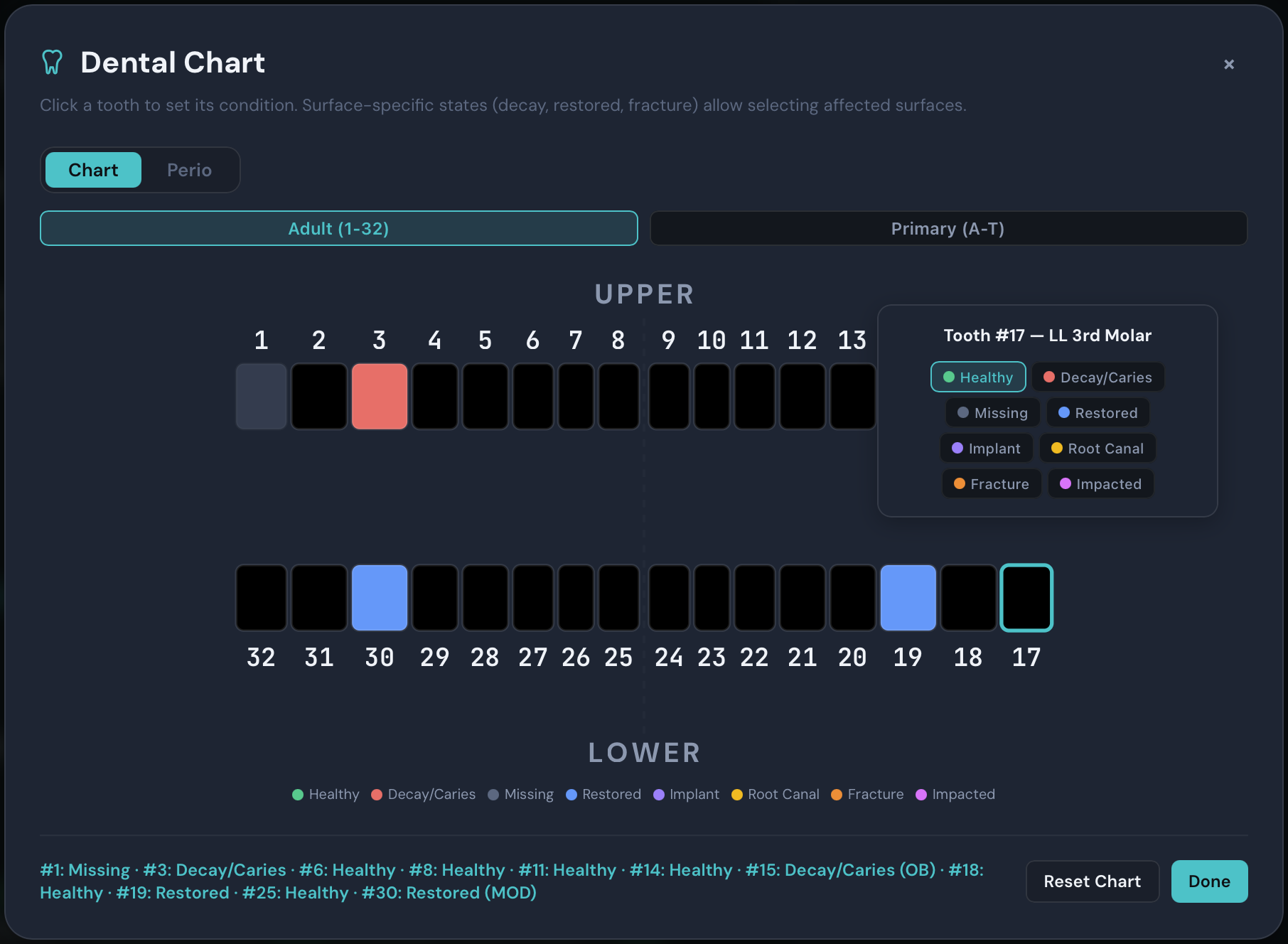
An interactive SVG dental chart that integrates directly with AI note generation and billing codes.
32 + 20 Tooth Charts
Full adult (32-tooth) and primary (20-tooth) charts with one-click toggle between permanent and deciduous dentition.
8 Clinical States
Healthy, Decay/Caries, Missing, Restored, Implant, Root Canal, Fracture, and Impacted — each with a distinct color for instant visual identification.
5-Surface Marking
M, O, D, B, L for posterior and M, I, D, F, L for anterior teeth. Anatomical validation prevents impossible surface combinations.
AI-Integrated
Dental findings serialize directly into the AI prompt for note generation and parse back from AI responses. Acronym protection for FPD, RPD, SDF. Chart SVG and findings table export to PDF.
Perio
Full periodontal charting, voice-driven.
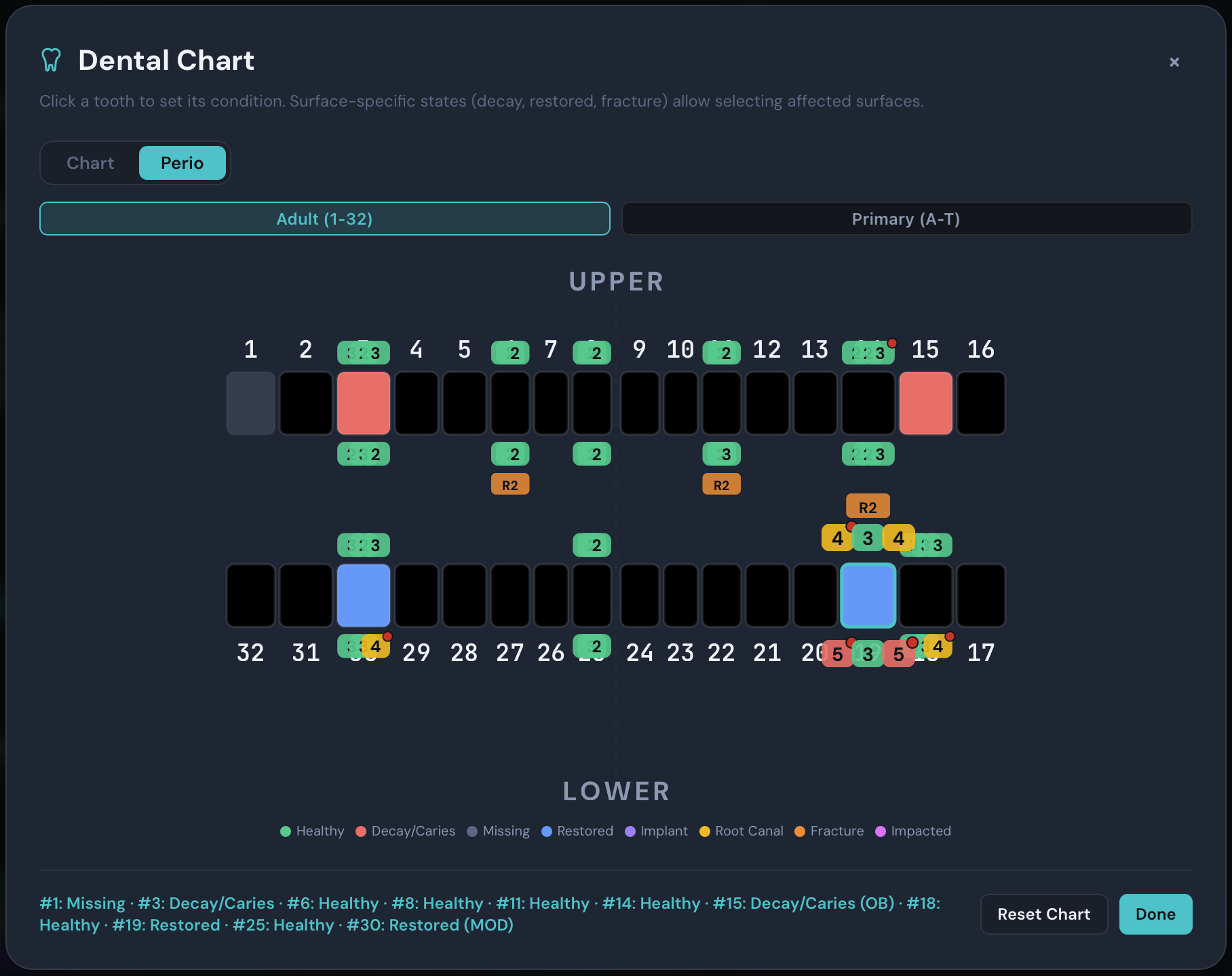
Toggle perio mode to overlay probing depths, bleeding, recession, mobility, and furcation data directly on the chart — enter measurements by voice or click.
6-Point Probing Depths
Record MB, B, DB, ML, L, and DL depths per tooth. Color-coded pills — green (1–3 mm), yellow (4–5 mm), red (6+ mm) — overlay directly on the chart for instant visual assessment.
Voice-Driven Entry
Say “three two four” and probing depths auto-fill for the selected tooth. The perio voice parser recognizes spoken numbers and maps them to the correct surfaces — hands-free charting during exams.
BOP, Recession & More
Track bleeding on probing per site, recession measurements, mobility grades (0–3), and furcation involvement (Class I–III). All indicators render as visual overlays on each tooth.
Documentation Scoring
After note generation, a template-specific checklist scores your documentation completeness — verifying chief complaint, probing depths, BOP, bone loss, AAP staging, consent, and more.
Billing
Automatic medical & dental coding.
ClinicalFlow suggests billing codes from the generated note — saving time on coding and helping capture visit complexity.
ICD-10
Diagnosis Codes
Up to 8 diagnosis codes per encounter, each with a confidence level. Extracted directly from the assessment section of the generated clinical note.
Max 8 codesConfidence levels
CPT + E&M
Procedure & Evaluation Codes
Up to 4 procedure codes with automatic E&M level assessment based on documented complexity, time, and medical decision-making.
Max 4 codesE&M level
CDT + Dental ICD-10
Dental Billing Codes
D-codes with 4 guardrails: depth/severity escalation, structural vs. positional trauma detection, etiology of absence tracking, and dental-specific ICD-10 pairing.
D-codes4 guardrailsDental ICD-10
Audit Flags
Billing Risk Detection
Every code suggestion includes AI-generated audit flags that identify potential billing risks — upcoding warnings, missing documentation, and modifier requirements. Displayed in a collapsible panel for quick review.
Risk alertsCollapsible
Clinical Warnings
Documentation Safety Checks
Automated warnings flag clinical documentation gaps — missing informed consent, undocumented allergies, incomplete exam findings. Helps catch issues before the note is finalized.
Safety checksCollapsible
Auto-Suggest
Toggleable Code Suggestions
Enable or disable automatic code suggestions per session. When enabled, ICD-10, CPT, and CDT codes appear immediately after note generation. Toggle from the AI & Transcription settings.
On/Off togglePer session
Integrations
Connect to your existing systems.
Export notes to your EHR, sync with your practice management system, and generate insurance narratives — all from within ClinicalFlow.
EHR Integration
HL7 FHIR Export
Copy notes formatted for your EHR or export as HL7 FHIR documents. Configure facility name, facility ID, and default patient MRN for compliant clinical document exchange.
Copy for EHRHL7 FHIRFacility Config
PMS Bridge
Practice Management Systems
Sync patient data and clinical notes directly with OpenDental (REST API), Dentrix (SOAP/COM), and Eaglesoft (ODBC). Configure connection credentials and test connectivity from Settings.
OpenDentalDentrixEaglesoft
Insurance Narrative
AI Medical Necessity Letters
One-click AI generation of 3–7 sentence medical necessity narratives. References specific clinical data — probing depths, BOP percentage, radiographic bone loss, tooth diagnoses — with CDT and ICD-10 citations.
AI-GeneratedCDT/ICD-10Copy to Clipboard
Dual Mode
Online precision. Offline freedom.
Choose the engine that fits your needs. Deepgram for cloud streaming or go fully offline.
☁ Recommended
Online Mode
Maximum accuracy using cloud AI models purpose-built for clinical documentation.
Deepgram Nova-3 Medical — purpose-built for clinical speech with drug name and condition recognition, plus keyterm boosting with up to 100 medical terms per session
Claude Haiku 4.5 — fast, efficient AI for clinically accurate note generation with two-pass verification for hallucination, contradiction, and omission detection
Real-time speaker diarization — automatic identification and labeling of who is speaking
Streaming transcription — words appear on screen within 200–300ms of being spoken
~$0.10–0.15 per encounter — including transcription and AI note generation
💻 Full Privacy
Offline Mode
Everything runs on your machine. No internet. No data leaves your computer. Ever.
Whisper large-v3-turbo — OpenAI’s speech recognition running locally via Metal GPU-accelerated whisper-server, processing 2-second audio chunks with adaptive sizing. No audio ever transmitted
Ollama — open-source local AI. Default model LLaMA 3.1 8B, but you can run Mistral, Gemma, Qwen, or any Ollama-compatible model on your own hardware, free forever
Zero network requests — in full offline mode, ClinicalFlow makes no outbound connections whatsoever
Ideal for rural clinics — works without Wi-Fi, cellular, or any internet infrastructure
Free — runs on your hardware, no subscriptions or API costs
Two-Pass Verification
Unlike simple AI scribes that generate and ship, ClinicalFlow runs a second pass. After generating the note, a separate AI verification step (temperature 0.1 for maximum determinism) audits every claim against the original transcript — catching errors before they reach the chart.
Hallucination detection — removes any finding, diagnosis, or exam result not supported by the transcript
Contradiction detection — catches when the same finding appears as both positive and negative
Omission detection — identifies prescriptions, orders, and recommendations mentioned but missing from the note
Categorization audit — verifies medications are correctly classified as new, continued, or discontinued
Built for Speed
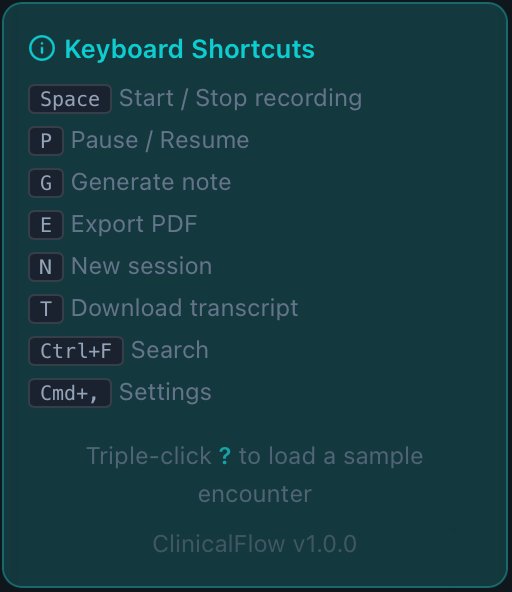
ClinicalFlow is designed around 10 keyboard shortcuts and minimal clicks. Start recording, generate a note, and export — all without touching the mouse.
Space Start / stop recording
P Pause / resume
G Generate note
E Export PDF
N New session
T Download transcript
Cmd+R Toggle recording
Cmd+F Search transcript
Cmd+, Open settings
Escape Close all modals
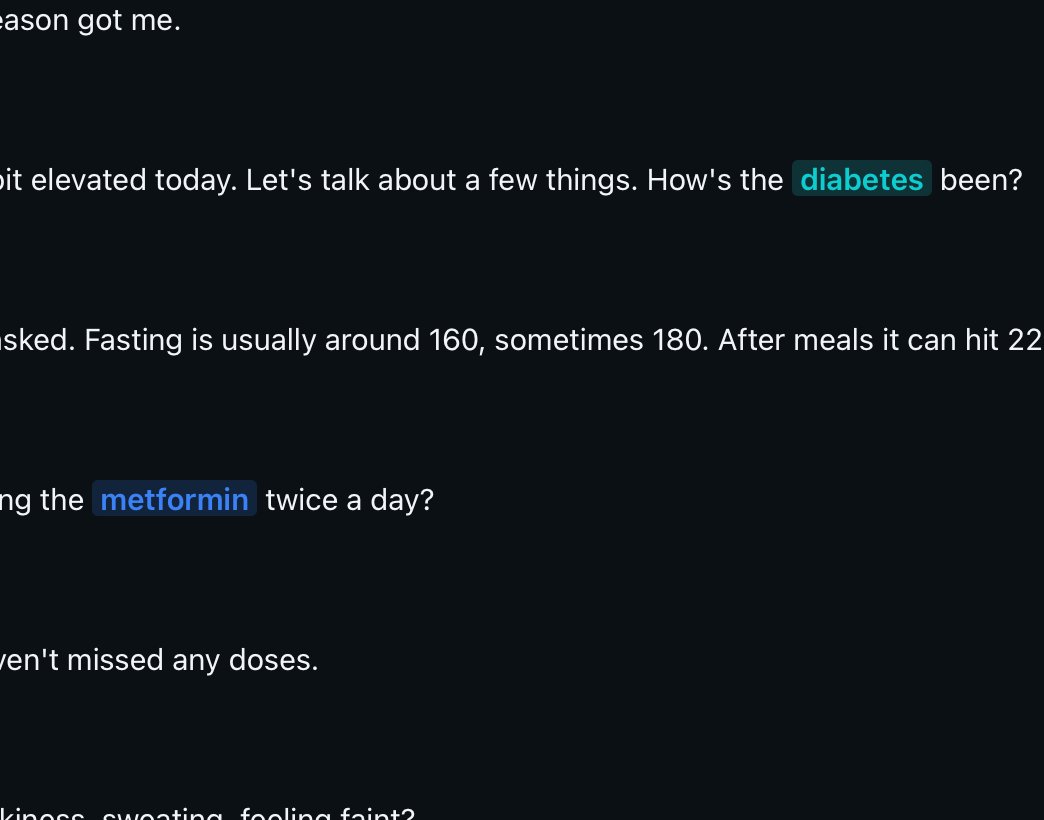
Resizable panels · Collapsible sidebar · Dark and light themes · 1,300+ medical terms highlighted in transcript
Medical Term Post-Processing
Speech-to-text engines often garble medical terminology. ClinicalFlow applies 325+ correction patterns across 6 languages after transcription, automatically correcting drug names, conditions, units, and vital sign formats.
6-language coverage — 325+ patterns across English, Spanish, French, German, Portuguese, and Italian
Extensible dictionary — corrections.json can be customized for your specialty’s specific terminology
Smart Notes
Dictionary-powered notes. Context on hover.
Toggle on intelligent tooltips, autocomplete, and quick-insert tools that make your generated notes interactive and easier to review. All features are individually toggleable in Settings → Advanced → Notes.
Abbreviation Tooltips
Hover over abbreviated terms like “BID,” “PRN,” or “HTN” to see their full expansion. Great for reviewing notes quickly or onboarding new staff.
Medication Cross-Reference
Hover over any medication to see generic/brand name mapping and drug class. Works for both brand and generic names throughout the generated note.
Scoring Quick-Reference
Clinical scoring systems like PHQ-9, GAD-7, NIHSS, and GCS show interpretation ranges on hover — no need to look up score meanings separately.
Dental Tooth Labels
Tooth number references (#14, #30, etc.) display blue badge tooltips with the tooth name and anatomical location — instant chairside reference.
Quick-Insert Palette
Press Ctrl+J while editing a note to open a template-aware phrase palette. Presents commonly used phrases appropriate for your current template — SOAP, dental, radiology, and more.
Note Autocomplete
Type 3 or more characters while editing a note line to get medical term suggestions from the dictionary. Select a suggestion to insert the complete term instantly.
Global
37 languages. One workflow.
Full pipeline support — transcription, correction patterns, note generation, and UI locale — in every language.
37
Languages Supported
Complete transcription and note generation pipeline including English, Spanish, French, German, Portuguese, Japanese, Korean, Chinese, Hindi, Arabic, and 27 more.
6
Correction Dictionaries
Dedicated medical term correction patterns across English, Spanish, French, German, Portuguese, and Italian — 325+ patterns total.
325+
Correction Patterns
Post-processing rules that automatically fix misrecognized drug names, conditions, vitals, and medical terminology across all 6 dictionary languages.
Security
Patient data deserves real protection.
ClinicalFlow implements HIPAA technical safeguards at every layer.
AES-256 Encryption at Rest
All session data, transcripts, clinical notes, and API keys are encrypted on disk using AES-256-GCM with PBKDF2-HMAC-SHA256 key derivation (100,000 iterations). Even if your device is stolen, patient data is unreadable without your PIN.
PIN-Protected Access
A 4–8 digit numeric PIN is required every time ClinicalFlow launches. Verified using Argon2id hashing with random salt and never stored in plaintext. Auto-lock engages after 5 minutes of inactivity (configurable) to protect unattended devices.
Sanitized Audit Logs
Structured logging captures every operation with timestamps — but never logs transcript text, patient names, or clinical content. Logs are rotated daily and automatically cleaned after 30 days.
Transparent Network Behavior
In online mode, data is sent only to Deepgram (audio) and Anthropic (transcript) over encrypted TLS connections. Strict Content Security Policy headers limit connections to only these approved endpoints. In offline mode, zero network requests leave the device.
Atomic File Operations
All writes use a temporary file + rename pattern to prevent corruption from unexpected shutdowns. If a file is detected as corrupted, it’s automatically backed up to a .corrupted.TIMESTAMP file before recovery. macOS hardened runtime with audio input and network client entitlements.
Localhost-Only Whisper
The local Whisper transcription server binds exclusively to 127.0.0.1 — no network exposure, no external access. Audio data never leaves your machine’s loopback interface.
Requirements
Runs on hardware you already have.
ClinicalFlow is lightweight. Offline mode needs more resources for local AI models.
Online Mode
Minimum Requirements
When using cloud transcription and cloud AI, the app itself is very lightweight.
macOS 11.0+ (Apple Silicon or Intel) or Windows 10+
4 GB RAM
~700 MB disk space (app + bundled Whisper model)
Internet connection & a microphone
Deepgram API key (free tier: $200 credit) and Anthropic API key
Offline Mode
Recommended Specs
Local Whisper and Ollama models require more compute. A recent Mac or Windows PC with 16 GB+ RAM is ideal.
Apple Silicon Mac (M1+) or Windows with dedicated GPU recommended
~8 GB disk space for Whisper model (574 MB) and Ollama models (~4–8 GB)
No internet required — Ollama installed separately (free, one-time setup)
Why ClinicalFlow
This isn't another AI toy. It's a clinical weapon.
Every other "AI scribe" asks you to compromise — on privacy, accuracy, specialty coverage, or connectivity. We don't. ClinicalFlow was built from the ground up by clinicians who were sick of half-baked tools that couldn't survive a real workday.
100% Offline. Zero Excuses.
Most AI scribes die without Wi-Fi. ClinicalFlow runs entirely on your machine — Metal-accelerated Whisper, local Ollama LLM, no cloud, no latency, no data leaving your laptop. Ever. Rural clinic? Surgical suite? Airplane? It doesn't care. It just works.
22 Templates. Not 3.
SOAP, H&P, DAP, BIRP, Progress, Procedure, Consult, Radiology Diagnostic, Radiology IR, ten dental templates, and more. Each one has a purpose-built clinical prompt — not a generic "summarize this" wrapper. Your notes read like you wrote them.
Edit Like a Document, Not a Form
Inline editing with move, add, delete, drag-reorder, and line-level voice dictation. No copy-paste gymnastics. Click a line, talk, done. Every note section is live-editable the instant it generates. No "locked" outputs. No "regenerate and pray."
Real Dental Charting. Interactive.
Other tools pretend dental doesn't exist. ClinicalFlow has a full interactive dental chart — click surfaces, mark conditions, track all 32 teeth with 8 clinical states. Voice-driven perio charting with pocket depths, BOP, recession, and CAL. This isn't a checkbox. It's a clinical instrument.
Medical Coding That Actually Helps
Automatic ICD-10, CPT, CDT, and E&M code suggestions from the note itself — not a separate lookup tool. Includes audit risk flags, clinical warnings, and dental-specific guardrails. Bills don't get rejected. You don't get audited.
Security Isn't a Feature. It's the Architecture.
AES-256-GCM encryption with your PIN. PBKDF2 key derivation. No cloud storage. No accounts syncing PHI. No "trust us" hand-waving. Your data lives on your machine, encrypted at rest, and never touches a server unless you choose cloud transcription. Period.
37 Languages. 325+ ASR Corrections.
English, Spanish, French, Mandarin, Arabic, Hindi — and 31 more. Every language gets the same real-time correction engine that catches what speech-to-text garbles: drug names, anatomy, procedures, scoring systems. Your transcript is clean before the note even generates.
Cloud When You Want It. Not When You Need It.
Online mode gives you Deepgram Nova-3 Medical with real-time speaker diarization and Claude Haiku for note generation — ~$0.10 per encounter. Switch between online and offline with a single toggle. No vendor lock-in. No "enterprise plan required" for basic features.
Still comparing? Other AI scribes charge $150–$400/month, require always-on internet, support 2–3 templates, and can't spell "amoxicillin" correctly. ClinicalFlow starts at $25/month with a 14-day free trial and does everything above on day one.